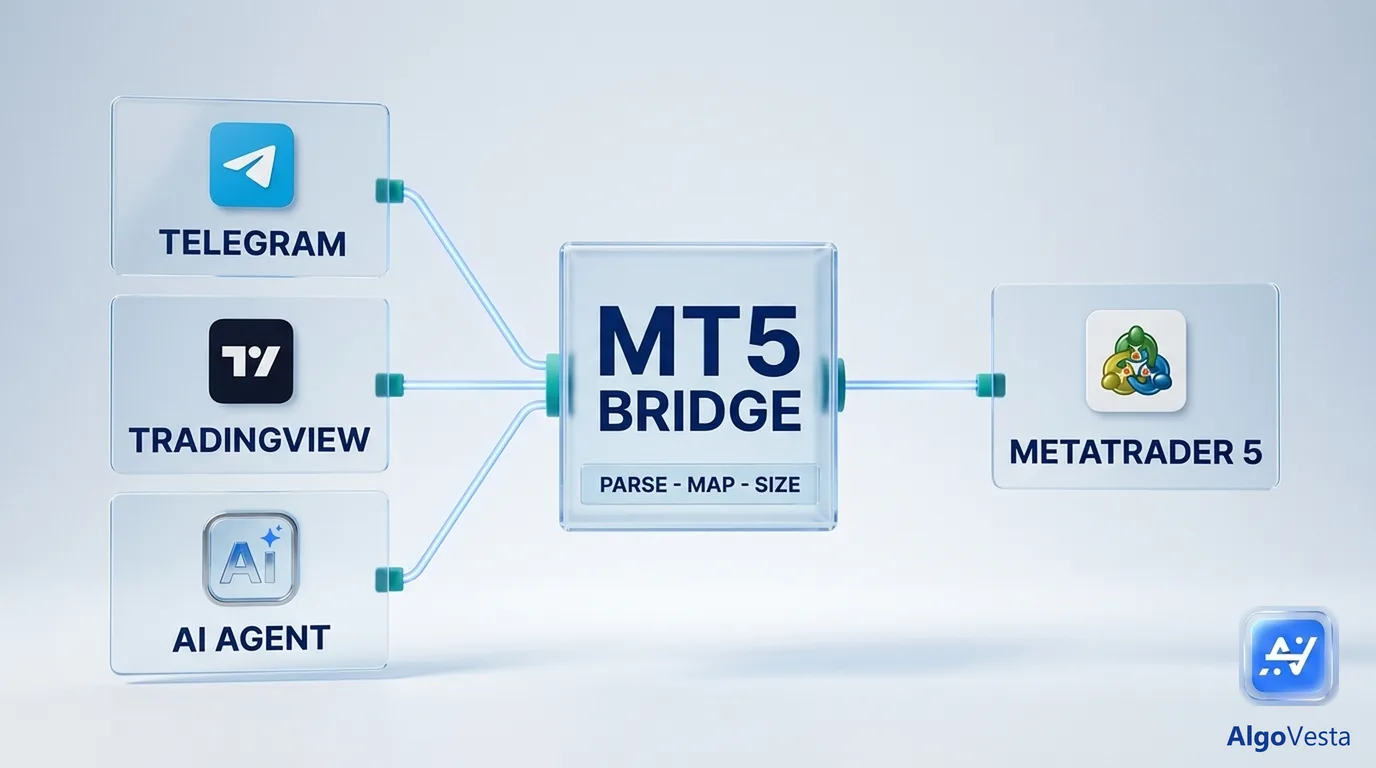
Short answer: An MT5 bridge is the software layer that takes a trading signal from an outside source (a Telegram channel, a TradingView alert, or an AI agent) and turns it into a real order on your MetaTrader 5 account, with the correct symbol, lot size, stop loss and take profit. MetaTrader 5 cannot read a Telegram message or receive a webhook by itself, so something has to sit in between. That "something" is the bridge.
This guide explains how a bridge works, compares the three common setups, and gives you a checklist for choosing one without learning the hard way.
Why MetaTrader 5 needs a bridge at all
MetaTrader 5 is a trading terminal. It is very good at placing and managing orders, but it has no built-in way to:
- listen to a Telegram channel,
- accept an HTTP webhook from TradingView,
- take instructions from an AI assistant such as Claude or ChatGPT.
A signal like “BUY XAUUSD 2340, SL 2332, TP 2348 / 2355” is just text until something does four things with it: reads it and understands it, maps “XAUUSD” to the symbol your broker actually uses (for example XAUUSDm or GOLD), calculates the lot size, and sends the order to your terminal. That chain is the bridge.
How a signal travels from source to MT5
Every MT5 bridge, whatever it is called, runs the same five steps:
- Receive. The signal arrives: a Telegram message, a TradingView webhook, or a tool call from an AI agent.
- Parse. The text or JSON is turned into structured fields: direction, symbol, entry, stop loss, one or more take profits.
- Map. The generic symbol is matched to your broker’s symbol, and the pip size is resolved for that instrument. Gold, JPY pairs and major pairs all use different pip sizes.
- Size. The lot is calculated from your rules (fixed lot, risk percentage or signal-provided size) and fitted to the broker’s lot step.
- Execute and verify. The order is sent to the MT5 terminal. The bridge then confirms that the position exists and that its stop loss and take profit are actually set on the broker side.
Step 5 is where many setups quietly fail. An order that opens without its stop loss is not a small bug; it is an unprotected position.
The three types of MT5 bridge
1. Local Expert Advisor (EA) on your own PC or VPS
You install an EA in your own MetaTrader 5 terminal, and a separate program (often a desktop app) forwards signals to it.
Pros: full control, nothing leaves your machine. Cons: the terminal must run 24/7, so you usually rent a VPS. You maintain Windows updates, terminal restarts, EA versions and connection drops yourself. If the VPS reboots at night, signals are missed.
2. Cloud API service
A third-party cloud service connects to your MT5 account through its own API, and a signal tool talks to that API.
Pros: no terminal on your side. Cons: you often pay two subscriptions (the signal tool and the API service), and two companies in the chain hold your account access. Troubleshooting a failed order means checking two dashboards.
3. Hosted terminal (bridge and terminal run for you)
The provider runs real MetaTrader 5 terminals on its own servers and connects your account to one of them. The signal parser, the bridge and the terminal sit in one system.
Pros: no VPS, no EA to install, no second API subscription. One place to see why a signal did or did not become a trade. Cons: you rely on one provider, so its safety rules and transparency matter a lot (see the checklist below).
| Feature | Local EA + VPS | Cloud API service | Hosted terminal |
|---|---|---|---|
| You install software | Yes (EA + forwarder) | No | No |
| VPS needed | Yes | No | No |
| Subscriptions | Signal tool + VPS | Signal tool + API service | One |
| Who keeps the terminal online | You | API provider | Bridge provider |
| Where to debug a failed order | Your VPS logs | Two dashboards | One dashboard |
| Typical failure | VPS reboot, terminal closed | Sync delay between services | Provider-side issue |
AlgoVesta uses the third model. Customer MT5 accounts run on terminals AlgoVesta hosts, so there is no VPS, no EA and no separate API subscription on your side.
7-point checklist for choosing an MT5 bridge
Use these questions with any provider, including us.
1. Does it refuse to open a trade without a stop loss and take profit?
If the signal has no SL and you have not set a default in pips, a safe bridge should not open the trade. After the order fills, it should also confirm that SL and TP really exist on the position. At AlgoVesta both checks are mandatory: a forex trade whose SL and TP cannot be guaranteed is not opened; a position found unprotected after opening is closed as a safety measure.
2. How does it handle multiple take profits?
In MT5, one position can hold only one TP. So “TP1 / TP2 / TP3” has to be executed as separate positions, one per target, with your lot split between them. Ask the provider to show you the split before you go live. Watch for two details: lot step — on a broker with a 0.10 lot step, legs like 0.15 / 0.09 / 0.06 are invalid and get rejected, a good bridge fits every leg to the lot step; and netting accounts — on a netting account, orders in the same direction merge into one position, so multi-TP cannot work as intended, a careful bridge detects this and opens a single position with the full lot at TP1, instead of silently producing something else.
3. Does it map your broker’s symbol and pip size correctly?
XAUUSD might be XAUUSDm, XAUUSD.a or GOLD at your broker. If the bridge gets the pip size wrong on a suffixed symbol, a 20-pip TP can end up a tiny fraction of a pip away from entry. Test with your broker’s actual symbol names.
4. How fast is it end to end?
Ask for a measured number from signal receipt to filled order, not a marketing phrase. For reference, from AlgoVesta’s own measurements: receiving and parsing a signal takes 17–67 ms; an end-to-end MT5 order took 849 ms in our live test, so about 1 second on MetaTrader 5.
5. What happens when the broker server name is slightly wrong?
Customers often type “Exness Real 12” instead of the exact server name. A good bridge searches the broker’s known servers instead of failing on the first attempt, and tells you clearly if the login number itself is not found.
6. Can the bridge close your positions on its own?
It should not. Closing should only happen in one of these cases: you close the position; you press a panic button; your own signal source sends a close; a closing time you configured is reached. AlgoVesta follows this rule and only closes the quantity it opened, never positions you opened manually.
7. When a signal does not become a trade, can you see why?
“Nothing happened” is the most frustrating failure. The bridge should show the reason in plain language: market closed, daily limit reached, symbol not available at your broker, SL missing, and so on.
Common MT5 bridge mistakes to avoid
- Running the bridge on a home PC. Sleep mode, Windows updates and power cuts all mean missed signals.
- Testing only on a demo with a different broker. Symbol names, lot steps and account modes (hedging vs netting) differ between brokers.
- Relying on the signal’s SL without a fallback. Set a default SL in pips for signals that arrive without one.
- Ignoring the account mode. Check whether your account is hedging or netting before using multiple take profits.
Setting up an MT5 bridge with AlgoVesta
- Create an account and start the bot setup.
- Choose your signal source: Telegram, TradingView or an AI agent (MCP).
- Connect your MT5 account with your login, password and broker server. A broker demo account works too.
- Set your risk rules: lot mode, default SL/TP in pips, daily loss limit and maximum open trades.
- Send a test signal and check the result in the panel.
The live demo lets you paste a real signal and watch it execute on a demo MT5 account in seconds — no signup, no credit card.
Frequently asked questions
An MT5 bridge is software that receives trading signals from an outside source such as Telegram, TradingView or an AI agent. It converts them into real orders on a MetaTrader 5 account with the correct symbol, lot size, stop loss and take profit.
Only if the bridge runs as an EA in your own terminal. With a hosted terminal, the provider keeps MT5 online, so you do not need a VPS.
Not necessarily. AlgoVesta’s order path supports MetaTrader 5 only. If you use MT4, check the provider’s order path, not just its marketing page.
Yes. The bridge reads the channel message, extracts direction, symbol, entry, SL and TPs, and places the order. Messages it cannot read confidently should be rejected, not guessed.
Only in step one. TradingView sends a webhook with a JSON or text message; Telegram delivers a channel message. After parsing, both follow the same path to MT5.
Because the signal had several take profits. MT5 allows one TP per position, so each target becomes a separate position with part of your lot. On a netting account this is not possible, and a careful bridge opens one position at TP1 instead.
Ask where it is stored and how. AlgoVesta stores trading credentials encrypted and uses them only to connect your account to its terminal.
Related reading
The bottom line
An MT5 bridge is the layer that makes a signal usable on MetaTrader 5 at all — receiving it, parsing it, mapping the symbol, sizing the lot, and confirming the order is actually protected. How a provider builds that layer, and how honestly it tells you when a signal did not become a trade, matters more than the marketing page. Run the 7-point checklist above against any bridge before you connect a real account.
Disclaimer. AlgoVesta is signal-routing automation infrastructure (Bring Your Own Signal). It runs execution infrastructure on your behalf using trade-only credentials; it does not generate signals, hold, receive, or move client funds, and does not provide investment advice or trading recommendations. Execution times are averages measured across live-tested trades and may vary. Forex trading carries substantial risk of loss; leveraged positions may be fully liquidated. Past performance does not guarantee future results.
The authoritative version of this article is the English original; translations are provided for convenience.
Ready to automate your trading workflow?
Connect your exchange with secure, trade-only API keys.
Start Free — 7 DaysRelated comparisons: Cornix · TSCopier · TelegramFXCopier · Copygram · PineConnector