Short answer: To automate TradingView alerts to Binance, you send your alert's webhook to an execution platform that parses it and places the order on your Binance account — TradingView itself never touches an exchange. AlgoVesta routes one TradingView webhook to Binance Futures (and Spot) and to MetaTrader 5 forex from the same alert, so a single strategy can trade BTC on Binance and gold on MT5 without running two separate setups. No VPS, no Expert Advisor, no code — average execution is 4.1 seconds on Binance and 1.2 seconds on MT5, stop-loss and take-profit included.
Binance is where most crypto strategies get tested against — the deepest liquidity, the most pairs, the exchange most Telegram channels and TradingView scripts are built around. The question isn't whether to automate to Binance; it's what happens the moment your strategy also needs to touch forex. This guide covers both.
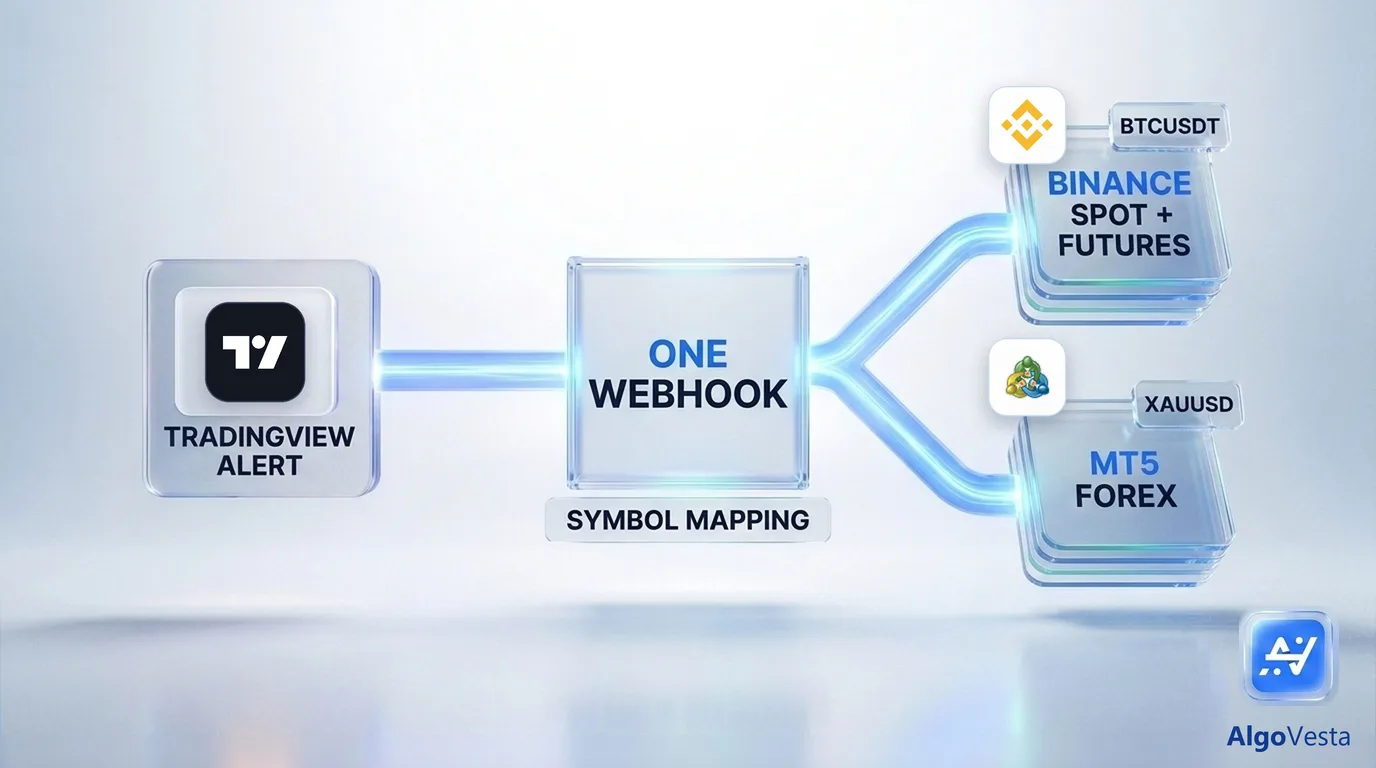
TradingView fires the alert — it never reaches Binance on its own
When your Pine Script strategy's alert condition triggers, TradingView sends a webhook — an HTTP request carrying a JSON payload — to a URL you specify. That's the entire mechanism. TradingView has no concept of an exchange account; it doesn't know what Binance is. Everything after that webhook — receiving it, parsing it, placing the order on your Binance account — is the job of whatever execution layer sits behind it.
A typical alert payload is simple: {"symbol":"BTCUSDT","action":"buy","risk_percent":2}. Turning that into a live Binance Futures or Spot order, with the right leverage, the right size, and stop-loss and take-profit attached, is where most of the real engineering lives.
Binance Spot and Futures, from one webhook
AlgoVesta connects your TradingView webhook directly to Binance — both spot and futures markets — with trade-only API access: generate a key with trading permission only, no withdrawal, and connect it once. Every qualifying alert executes automatically, with position size, stop-loss, take-profit, and leverage set by rules you configure, not left to the alert alone.
Adding MT5 forex — the same alert, a second market
Here's where this setup differs from a Binance-only integration. If your TradingView strategy also produces a forex signal — XAUUSD, EURUSD, or any major pair — the same webhook endpoint can route that signal to your MetaTrader 5 account, not just Binance. Symbol mapping decides where each alert goes: a BTCUSDT signal executes on Binance; an XAUUSD signal executes on MT5 — one strategy, one webhook, two markets.
Most TradingView-to-Binance tools stop at crypto. Adding MT5 usually means a completely separate integration — a second subscription, a second webhook setup, a second risk configuration. AlgoVesta collapses that into the same pipeline.
The MT5 side runs with no VPS, no EA, no MetaAPI
Binance is a REST API — straightforward to automate. MT5 is architecturally different: it requires a live terminal connected to your broker 24/7. Traditionally that means renting a Windows VPS, installing an Expert Advisor, or paying separately for a MetaAPI bridge. AlgoVesta hosts that MT5 terminal on its own infrastructure instead — you enter your account details, and none of that setup is yours to manage.
Risk rules on every Binance and MT5 order
Because both markets run through the same engine, one risk framework applies regardless of destination: position sizing, stop-loss enforcement, daily loss limits, drawdown protection, correlation limits, and a kill-switch. A TradingView strategy firing rapid alerts on Binance can't over-expose the account any more than one firing on MT5 — the same hard limits apply upstream on both.
Security: what your Binance API key should never have
Before connecting any TradingView-to-Binance tool, confirm the API key you generate is trade-only — trading permission enabled, withdrawal permission disabled. AlgoVesta never requests withdrawal access, so funds cannot be moved out of your Binance account even if a key were somehow exposed. Keys are AES-256 encrypted, and the execution server that places your orders stores no data itself.
Setting it up
- Build your strategy in TradingView and define the alert condition.
- Set the alert's webhook URL to your AlgoVesta endpoint — one time.
- Connect Binance (trade-only API key) and, if you trade forex, your MT5 account details.
- Map symbols and set rules — which alerts go to Binance, which go to MT5, plus position size, leverage or lot sizing, stops.
- Go live — one alert, both markets, automatically.
Test the full flow before connecting anything real
The live demo lets you paste a real TradingView-style signal and watch it execute on a demo Binance or MT5 account in seconds — no signup, no credit card. Every plan also includes unlimited paper trading with a $5,000 virtual balance.
Related reading
The bottom line
Automating TradingView alerts to Binance covers crypto. Adding MT5 to the same webhook covers forex too — one strategy, one alert, both markets, with the same risk rules and no separate infrastructure for either side. See the full TradingView integration, or connect Binance and 15 other exchanges alongside MT5.
Related comparisons: PineConnector · Cornix · 3Commas
Disclaimer. AlgoVesta is signal-routing automation infrastructure (Bring Your Own Signal). It runs execution infrastructure on your behalf using trade-only credentials; it does not generate signals, hold, receive, or move client funds, and does not provide investment advice or trading recommendations. Execution times are averages measured across live-tested trades and may vary. Crypto and forex trading carry substantial risk of loss; leveraged positions may be fully liquidated. Past performance does not guarantee future results.
The authoritative version of this article is the English original; translations are provided for convenience.
Ready to automate your trading workflow?
Connect your exchange with secure, trade-only API keys.
Start Free — 7 Days