Short answer: TradingView automation means connecting your TradingView alert’s webhook to an execution platform that places the trade for you — on crypto exchanges, on MetaTrader 5, or both from the same alert. TradingView itself never touches a broker or exchange; it only fires a signal. This guide covers everything: how the webhook actually works, how to route one alert to 16 crypto exchanges and MT5 forex, the security model that keeps your funds safe, and how to set it up end to end — including where you can test the entire flow live, for free, before connecting a real account.
To turn TradingView alerts into real orders, see the TradingView webhook setup.
If you’ve built a strategy in TradingView, you already know the frustrating part isn’t the idea — it’s everything that happens after the alert fires. This is the complete guide: what TradingView automation actually is, how it reaches crypto and forex markets, what to check before you trust any platform with it, and exactly how to set it up.
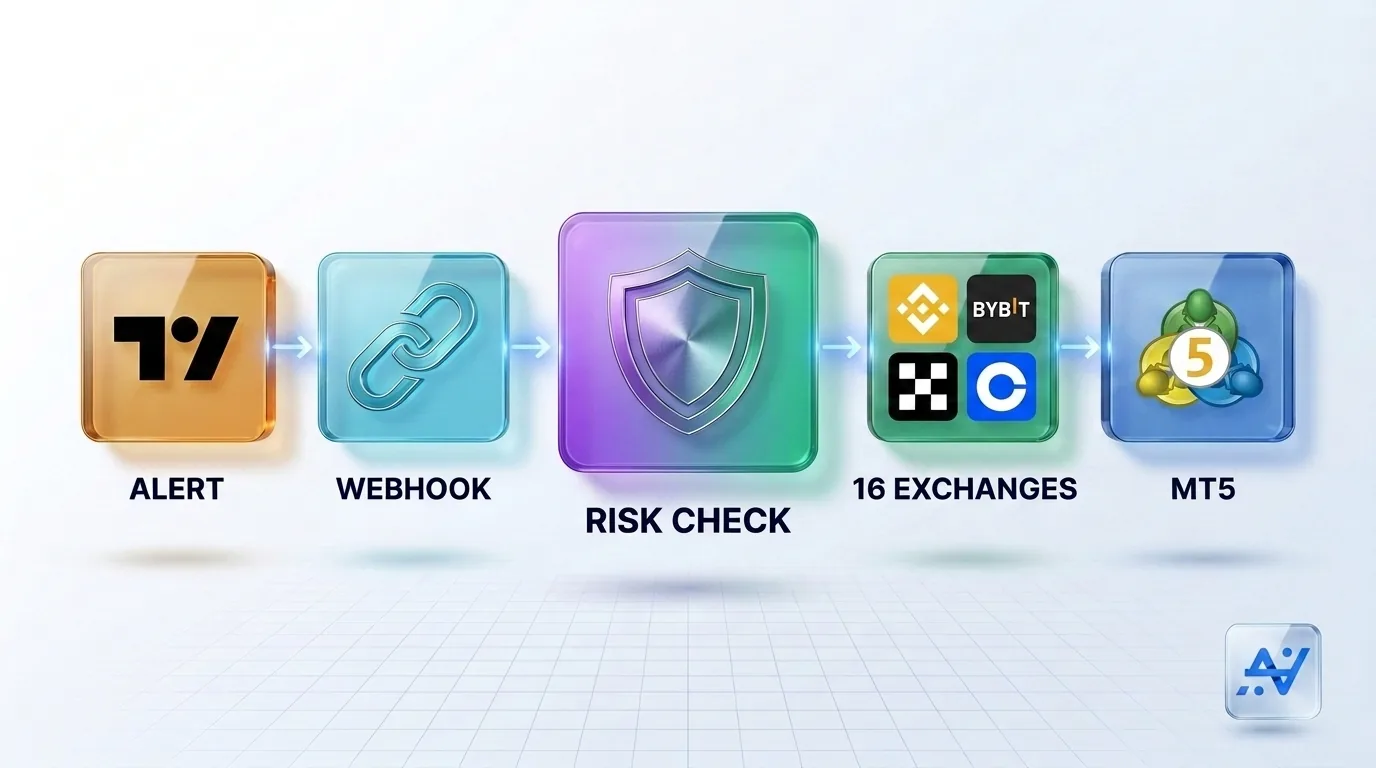
What TradingView automation actually means
TradingView is where strategies get built and tested — Pine Script conditions, backtests, alert rules. But TradingView is a charting and alerting platform, not a broker. When your alert condition triggers, TradingView sends one thing: a webhook — an HTTP request carrying a JSON message you define — to a URL you specify. That’s the entire mechanism. TradingView’s job ends there.
Everything after that POST request — receiving it reliably, parsing it into a real order, checking it against risk rules, and executing it on an exchange or broker — is the job of whatever sits on the other end of that webhook. That’s what “TradingView automation” really refers to: the execution layer, not TradingView itself.
From one alert to 16 crypto exchanges and MT5
The most common limitation traders hit is scope: most execution tools connect a TradingView alert to exactly one venue. If your strategy should trade both a crypto perpetual and a MetaTrader gold position, a single-venue tool forces you to pick, or to run two separate setups.
AlgoVesta’s TradingView webhook automation is built to route one alert across markets instead of locking it to one. Point your alert at a single webhook, and depending on the signal, the same strategy can execute on any of 16 crypto exchanges — spot and futures — or on MetaTrader 5 for forex, from one dashboard and one risk framework. A BTCUSDT signal lands on your chosen crypto exchange; an XAUUSD signal lands on MT5 — no separate infrastructure for either side. (For the exact webhook JSON, headers, and wiring, see the technical guide to automating a TradingView alert to crypto and MT5; for the strategic case for trading both from one source, see one TradingView strategy, two markets.)
The MT5 side: what most platforms don’t tell you
MetaTrader 5 is architecturally different from a crypto exchange. Crypto exchanges expose a REST API — generate a key, and a platform can trade directly. MT5 runs through a terminal, a live application that must stay connected to your broker 24/7. Traditionally, automating that means renting a Windows VPS, installing an Expert Advisor, or paying for a separate MetaAPI bridge — infrastructure you set up and maintain yourself.
AlgoVesta runs that terminal on its own managed infrastructure instead. You enter your MT5 account details, and there’s no VPS to rent, no EA to install, and no MetaAPI subscription to manage — the entire MT5 execution layer is handled for you.
Signal quality: not every alert should become a trade
A TradingView alert can misfire — a repainting indicator, a backtest artifact, a webhook duplicated by a flaky connection. Blindly executing every signal that arrives is a real risk. AlgoVesta’s optional AI signal filter screens incoming alerts for manipulation and duplication before they reach an order, and every signal — filtered or not — is logged with its outcome and reasoning, so nothing executes silently and unexplained.
Security: what to check before you connect anything
Before connecting any TradingView automation platform to a real account, confirm three things:
- Trade-only API access. Your exchange or broker key should never carry withdrawal permission — AES-256 encryption and a trade-only scope mean funds physically cannot move out, even if a key were compromised.
- Webhook-level protection. An IP allowlist and symbol whitelist on the webhook itself mean only your actual TradingView alert can trigger an order — not anyone who happens to find the URL.
- Risk rules enforced automatically, not left to you to remember: position sizing, stop-loss, take-profit, and daily loss limits applied to every trade without manual setup.
Step-by-step: connecting TradingView to crypto and MT5
- Build your strategy in TradingView and define the alert condition that should trigger a trade.
- Set the alert’s webhook URL to your AlgoVesta endpoint — a one-time setup per alert.
- Connect your venues — trade-only API keys for your crypto exchanges, and your MT5 account details if you trade forex.
- Configure your rules — position size, leverage or lot sizing, stop-loss, take-profit, and which symbols route to which market.
- Go live — or test the entire flow first.
Deciding whether to build the receiving side yourself, use a single-exchange tool, or a platform that reaches every venue at once? See 3 ways to connect a TradingView alert, compared.
Test it before you connect anything real
You don’t have to take any of this on faith. AlgoVesta’s live demo lets you paste a real signal and watch it execute on a demo MT5 or crypto account in seconds — no signup, no credit card. Every plan also includes unlimited paper trading with a $5,000 virtual balance on real market data, so you can run your actual TradingView strategy through the full pipeline before a cent is at risk.
Beyond TradingView: the same engine, more doors
TradingView is one way to trigger a trade, not the only one. The same execution engine also reads Telegram signal channels directly, and connects to Claude, ChatGPT, and other AI assistants through MCP — so a TradingView strategy, a Telegram channel, and a conversational AI request all pass through the identical risk framework and land on the same 16 exchanges and MT5.
The bottom line
TradingView automation is really about what happens after the alert — and that’s where the real differences between platforms live. Route one webhook to 16 crypto exchanges and MetaTrader 5, apply risk rules automatically, and keep your funds behind trade-only, withdrawal-proof security. See the full TradingView integration, or try the live demo with a real signal before you connect anything.
Related comparisons: PineConnector · AlgoWay · TradersPost · WebhookTrade
Disclaimer. AlgoVesta is signal-routing automation infrastructure (Bring Your Own Signal). It runs execution infrastructure on your behalf using trade-only credentials; it does not generate signals, hold, receive, or move client funds, and does not provide investment advice or trading recommendations. You configure the strategies, alerts, and rules, and you are responsible for them. Crypto and forex trading carry substantial risk of loss; leveraged positions may be fully liquidated. Past performance does not guarantee future results.
The authoritative version of this article is the English original; translations are provided for convenience.
Ready to automate your trading workflow?
Connect your exchange with secure, trade-only API keys.
Start Free — 7 Days