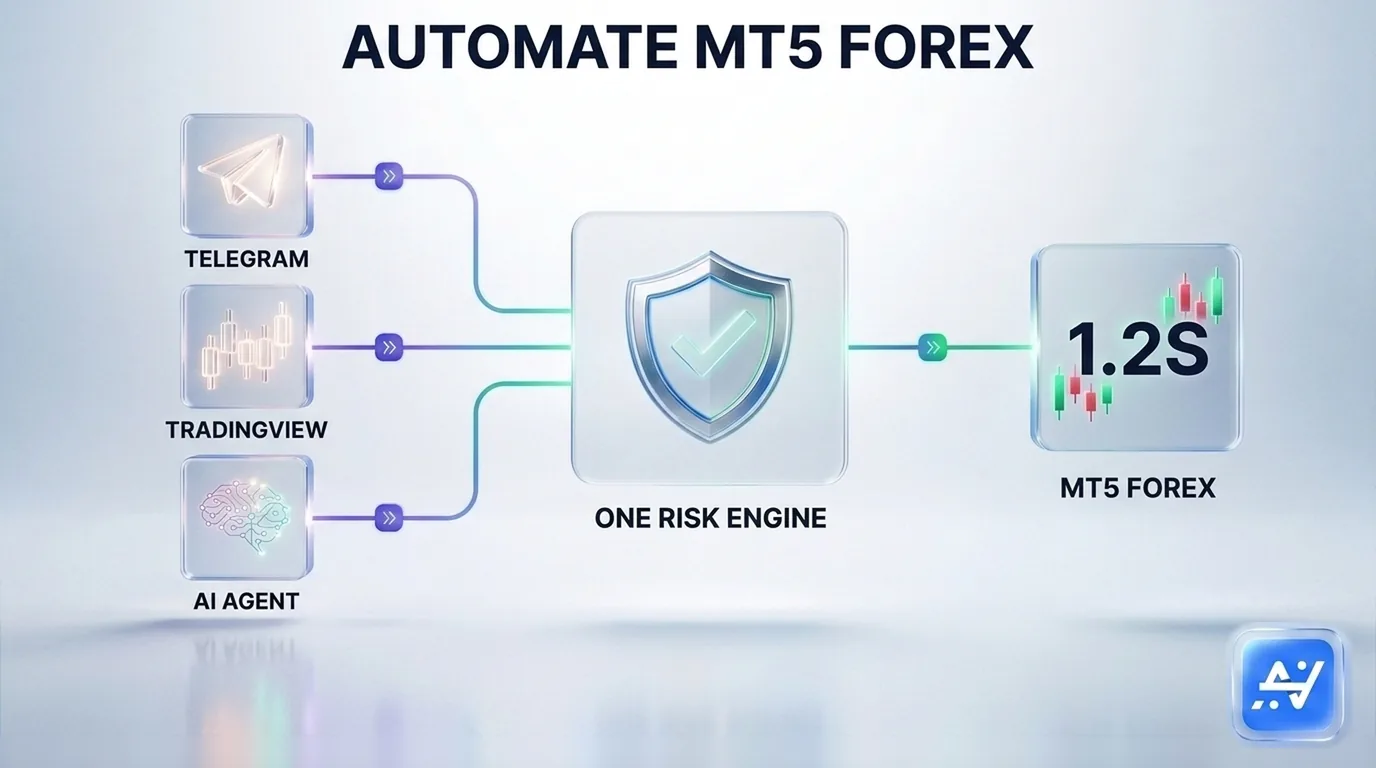
Short answer: You can automate MetaTrader 5 forex trading three ways with AlgoVesta — a Telegram signal channel, a TradingView webhook alert, or your own AI assistant (Claude, ChatGPT, Cursor) connected through MCP. All three route to the same MT5 execution engine, hosted entirely on AlgoVesta's infrastructure — no VPS, no Expert Advisor, no MetaAPI subscription required. Measured across 10,000 live-tested trades, average MT5 forex execution is 1.2 seconds including stop-loss and take-profit. Your funds stay in your own broker account under trade-only access that can never withdraw.
Forex traders on MetaTrader 5 have historically faced a setup wall before any automation even starts: rent a VPS, install an Expert Advisor, wire up a MetaAPI bridge — infrastructure work that has nothing to do with the actual strategy. This guide covers all three ways to automate MT5 forex trading without any of that, and how to pick the one that fits your setup.
Why MT5 forex automation is harder than it should be
MetaTrader 5 runs through a persistent terminal connected to your broker — unlike a crypto exchange's REST API, there's no simple key-and-go integration. Traditionally, automating an MT5 account means:
- Renting a Windows VPS to keep the terminal online 24/7.
- Installing and maintaining an Expert Advisor on that terminal.
- Or paying separately for a MetaAPI bridge as a cloud connection layer.
Every one of these is infrastructure the trader has to own and keep running — and if any piece fails silently overnight, automation stops without anyone noticing until a signal is missed. AlgoVesta hosts the entire MT5 terminal connection on its own servers instead, removing all three requirements for every signal source below.
Door one: Telegram signals to MT5
If your forex edge comes from a Telegram channel — a provider posting XAUUSD, EURUSD, GBPUSD or other pair calls — AlgoVesta connects directly to it, public or private groups both supported.
- AI reads the message in any format or language, extracting symbol, direction, stop-loss and take-profit, including image-based signals via OCR.
- 24/7 monitoring across multiple channels in parallel, each with its own rules.
- Order opens on MT5 in seconds, SL/TP attached in the same fill. (Full walkthrough: Telegram signal automation for crypto and MT5.)
Door two: TradingView webhooks to MT5
If your edge is a backtested Pine Script strategy, TradingView's webhook is the fastest route from alert to a live MT5 order.
- One webhook URL, pasted into your alert once — no code or manual JSON required.
- Same-second execution on MT5 — about 1.2 seconds average, SL/TP included.
- Optional AI filter screens out manipulated or duplicate alerts before they execute. (Deeper technical detail: automating TradingView alerts to crypto and MT5.)
Door three: your AI agent, via MCP
The newest way to trigger an MT5 trade: through your own AI assistant. AlgoVesta's MCP (Model Context Protocol) server connects Claude, ChatGPT, Cursor, or any MCP-capable client directly to your MT5 account alongside 16 crypto exchanges.
- Talk instead of configure — ask your assistant to check your MT5 balance, simulate a gold trade, or close a position, in plain language.
- Build your own agent — configure a personal AI agent to watch your signals and trade MT5 continuously under your rules.
- A server-side policy wall enforces your risk limits after the AI decides and before MT5 is touched — no prompt can override it. (Full breakdown: trade by talking to your AI.)
Same MT5 engine, same rules, regardless of source
Whichever door a forex signal comes through, it passes identical checks before becoming a live MT5 order: position sizing, stop-loss enforcement, daily loss limits, drawdown protection, and a kill-switch. A Telegram-sourced trade, a TradingView-sourced trade, and an AI-agent-sourced trade on the same MT5 account are governed by the exact same rules — not three different systems with three different safety nets.
Security specific to your MT5 account
Automating a forex account carries its own trust question: who controls your broker access? On AlgoVesta, the MT5 connection is trade-only — your broker credentials never grant withdrawal or fund-transfer capability, and on Elite plans your broker password itself is never shared with the execution layer via a secure MT bridge. The account, the funds, and ultimate control stay with you and your broker at all times.
Prop firm MT5 accounts
If you trade a funded MT5 account, the same three doors apply — with an added layer of protection built for evaluation rules specifically: per-account drawdown protection and prop-firm-compatible presets designed to help you stay inside a firm's daily loss and maximum drawdown limits, whichever door the signal arrives through.
Test MT5 automation before connecting a real account
You don't have to take any of this on faith. The live demo lets you paste a real signal and watch it execute on a demo MT5 account in seconds — no signup, no credit card. Every plan also includes unlimited paper trading with a $5,000 virtual balance on real market prices.
Related reading
The bottom line
Automating MT5 forex trading no longer requires a VPS, an Expert Advisor, or a MetaAPI subscription — and it no longer requires picking just one signal source. Telegram, TradingView, and your own AI assistant all reach the same hosted MT5 engine, under the same risk rules, with measured 1.2-second average execution. Use whichever door fits the trade in front of you.
Related comparisons: PineConnector · Cornix · 3Commas
Disclaimer. AlgoVesta is signal-routing automation infrastructure (Bring Your Own Signal). It runs execution infrastructure on your behalf using trade-only credentials; it does not generate signals, hold, receive, or move client funds, and does not provide investment advice or trading recommendations. Execution times are averages measured across live-tested trades and may vary. Forex trading carries substantial risk of loss; leveraged positions may be fully liquidated. Past performance does not guarantee future results.
The authoritative version of this article is the English original; translations are provided for convenience.
Ready to automate your trading workflow?
Connect your exchange with secure, trade-only API keys.
Start Free — 7 Days